Case Study_OTA (1)
xray4ota ©
Herein, automated analysis of the trans-conductance amplifier (OTA), universal analog building block, is depicted. The OTA is considered a circuit under test as shown in Figure 3. The outer terminals should be defined as 6x-ports; vin, vip, vdd, vss, vout, and ibiasn wherever, the internal structure of OTA be. Several kinds of analysis are used such as DC, transient, and AC analysis to define district parameters, as listed in tabel 1 and 2.
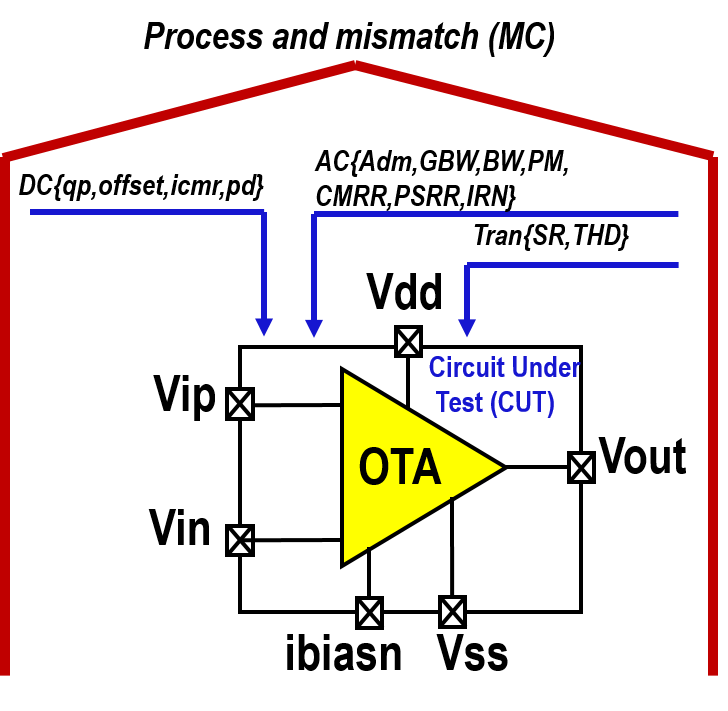
Figure 3. OTA under test.
Analysis |
Paramter |
|---|---|
DC/DC Sweep |
Total Current (A) |
Total Power (W) |
|
Offset (V) |
|
Vin_min (V) |
|
AC Analysis |
Dc-Gain (dB) |
Gain Bandwidth Product (Hz) |
|
Phase Margin (Deg) |
|
Bandwidth (Hz) |
|
CMRR (dB) |
|
PSRR+ (dB) |
|
PSRR- (dB) |
|
Input Referred Noise (V) |
|
Transient Analysis |
Slew Rate (V/sec) |
Total Harmonic Distortion (%) |
Analysis |
Paramter |
|
|---|---|---|
Monte-Carlo (MC) |
DC-Gain(dB) |
Mean (dB) |
Standard Deviation (dB) |
||
Cabability Process |
||
Gain Bandwidth Product(Hz) |
Mean(Hz) |
|
Standard Deviation(Hz) |
||
Cabability Process |
The developed tool is utilized to test two different structures of OTA to evaluate the tool’s effectiveness. The used structures of OTA are miller and folded-cascode, as depicted in Figure 4. After using the xray4ota tool, the electrical characteristics of OTAs are listed in the table 3.
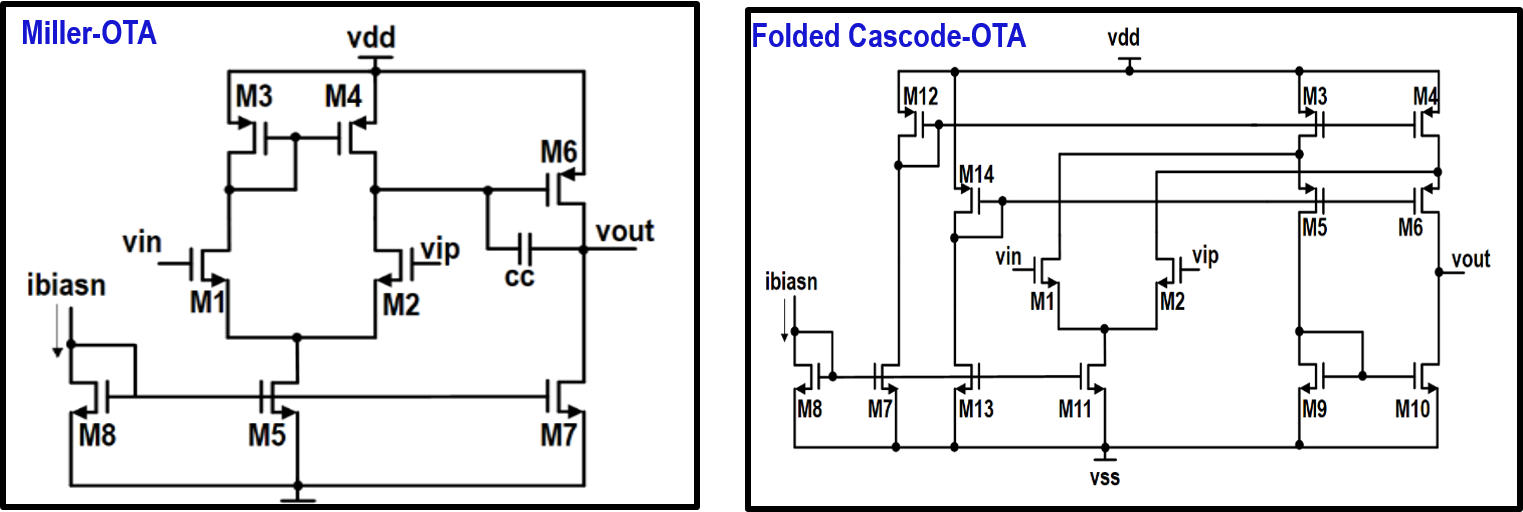
Figure 3. OTA circuit.
Analysis |
Paramter |
Miller Topology |
Folded-cascode Topology |
|---|---|---|---|
DC/DC Sweep |
Total Current (A) |
0.000176436 |
7.10188E-05 |
Total Power (W) |
0.000317585 |
0.000127834 |
|
Offset (V) |
0.0005257 |
0.0024598 |
|
Vin_min (V) |
0.54157 |
0.547968 |
|
AC Analysis |
Dc-Gain (dB) |
53.6652 |
43.0194 |
Gain Bandwidth Product (Hz) |
1.68395E+07 |
1.58434E+07 |
|
Phase Margin (Deg) |
69.1777 |
76.8771 |
|
Bandwidth (Hz) |
34962.6 |
112787 |
|
CMRR (dB) |
65.1424 |
78.7436 |
|
PSRR+ (dB) |
56.21563 |
73.814 |
|
PSRR- (dB) |
53.665 |
43.019 |
|
Total IRN (V) @ 1MEG |
2.29288E-05 |
2.28478E-05 |
|
Transient Analysis |
Slew Rate |
908993 |
2.07351E+06 |
THD (%)@ Vp of 0.65 V and freq.=1Khz |
0.943859 |
4.85748 |
|
Figure of Merits |
FOM1=Cl*SR/Pd (f.v/s.w) |
2.86e-03 |
1.62e-02 |
FOM2=Cl*GBW/Pd (f.Hz/w) |
5.30e-02 |
1.24e-01 |
Paramter |
Miller Topology |
Folded-cascode Topology |
|
|---|---|---|---|
DC-Gain (dB) |
Mean |
27.2 |
41.2 |
Standard Deviation |
15.9 |
5.37 |
|
CP |
1.05 |
3.1 |
|
CPK |
0.57 |
2.56 |
|
GBW (Hz) |
Mean |
7.74e+06 |
1.57e+07 |
Standard Deviation |
5.65e+06 |
8.39e+05 |
|
CP |
1.45 |
9.73 |
|
CPK |
0.4 |
5.84 |
Usage Steps
xray4ota tool
Please, follow the next steps to guarantee the of usage xray4ota tool effectively.
Draw the OTA circuit (Folded Cascode, Miller..etc) using XSCHEM, as shownin Figure 4.
Set all dimensions as design parameters,as shownin Figure 4.
Select a device and press “q”.
Replace L, W, nf, and mult as listed.
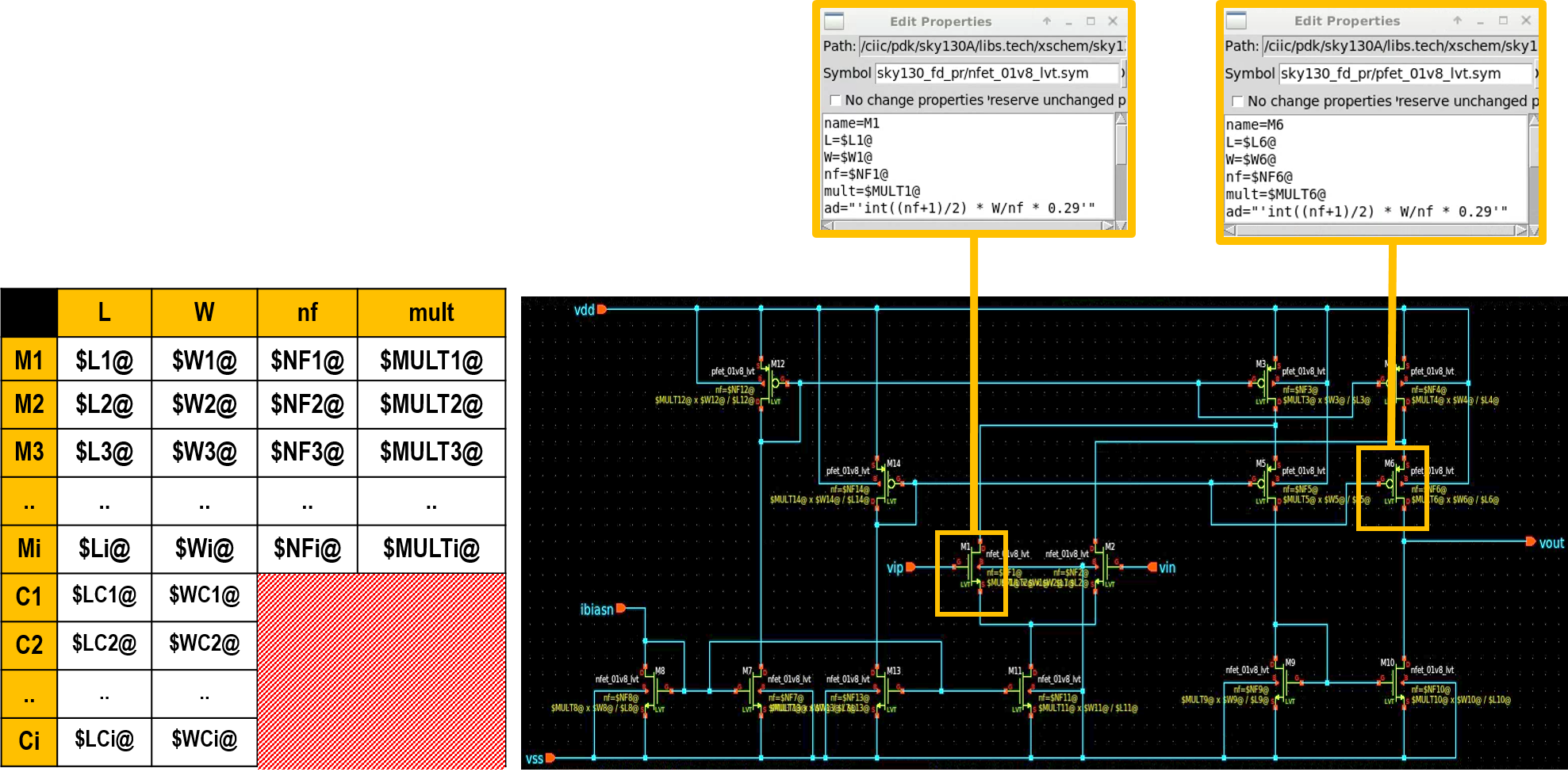
Figure 4. OTA circuit on XSCHEM.
Make sure the ports’ name as listed in Figure 5.
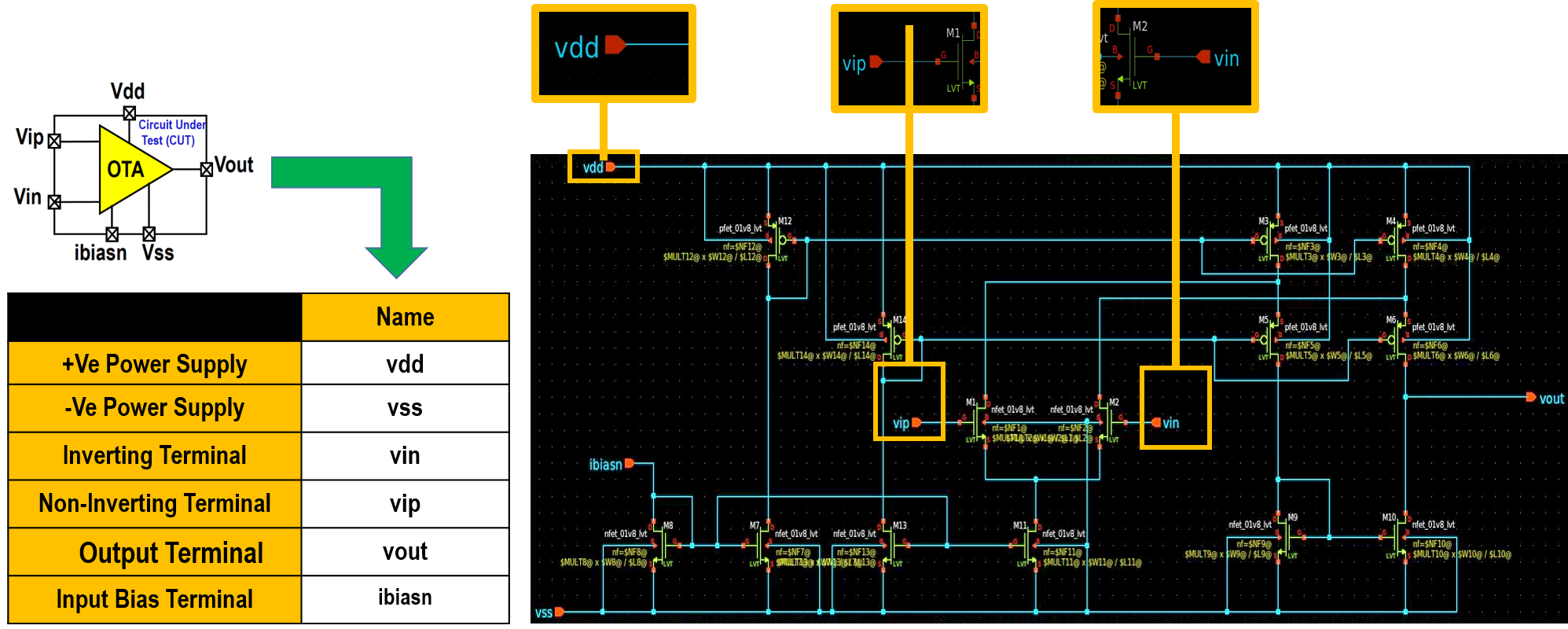
Figure 5. Port name on XSCHEM.
From XSCHEM as shwon in Figure 6, mark “LVS netlist:Top level is a .subckt”, then press “Netlist”
Save the netlist as ndiff-ota-circuit.spice

Figure 6. Generate netlist on XSCHEM.
Open an empty file and save it as a ota.cfg to present a configuration file for the design.
Open the ota.cfg file and edit the following contents to configure the previous design parameters, as shwon in Figure 7.
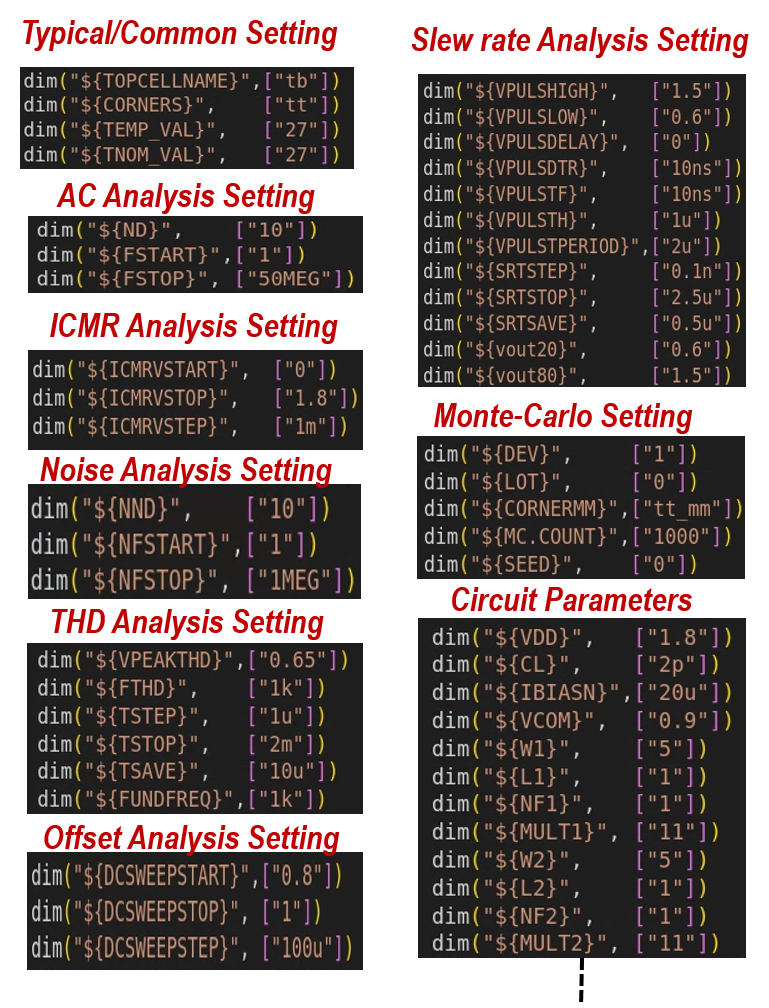
Figure 7. Configuration file
Open a file and save it as a specifications.txt to present the design specifications.
Open specifications.txt and edit the following upper/lower specification limits, as shown in Figure 8.

Figure 8. Design specification file
Note
The designer/user should submit 3X files:
1- ndiff-ota-circuit.spice
2- ota.cfg
3- specifications.txt
Copy those files to the folder named cut, as shown in Figure 9.

Figure 9. CUT file
Using the following command in Figure 10, XRAY4OTA script can be executed. Several folders and files are generated, depicted in Figure 11.

Figure 10. Command line

Figure 11. Generated files
As depicted in Figure 12, checklist lies in summary file.
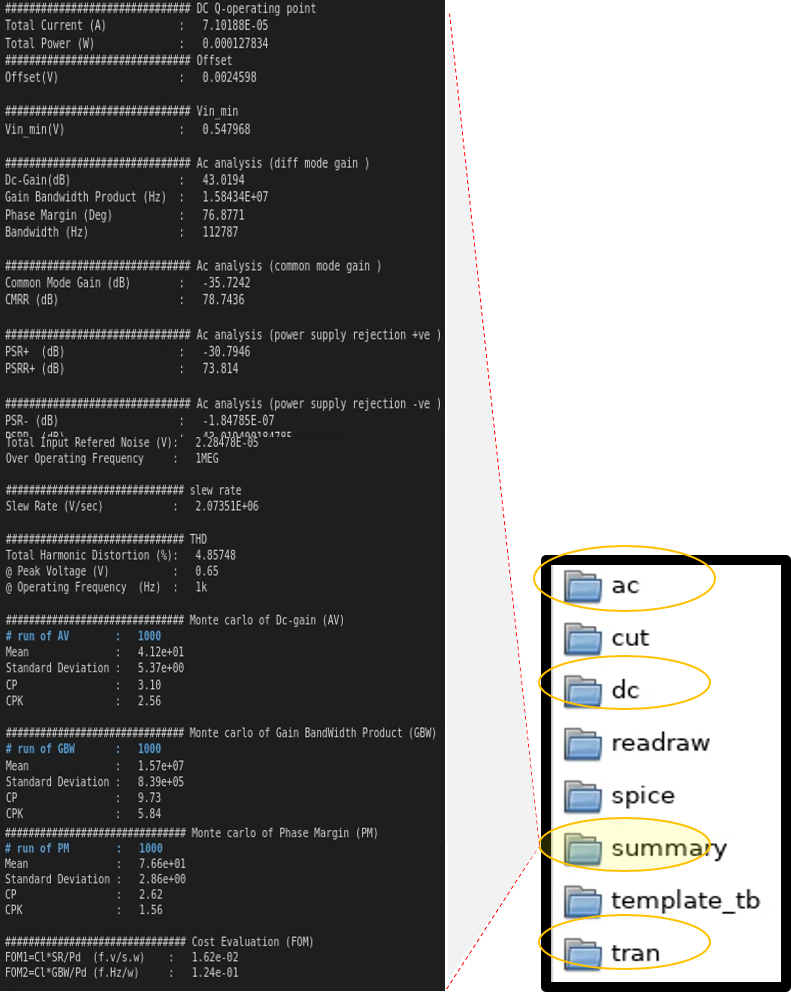
Figure 12. Generated files
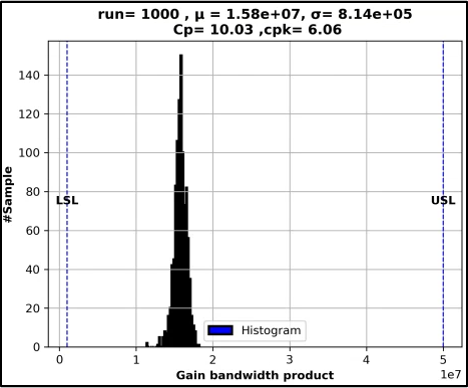
Figure 13. GBW
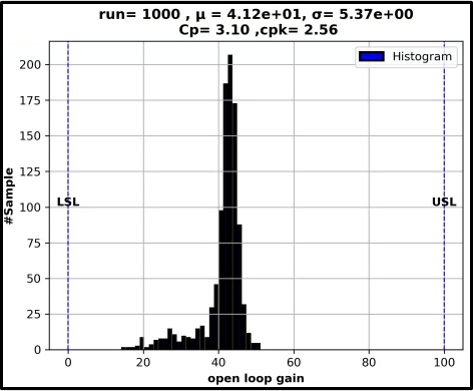
Figure 14. GBW
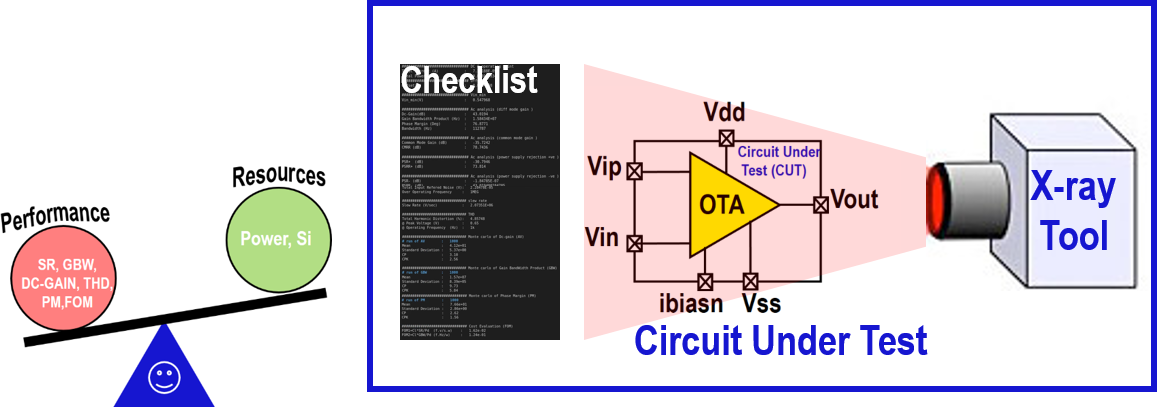
Figure 15. conclsion